Reminders
Put a reminder on any message, or plan reminders for yourself and your groups in the Reminders tab.
A reminder on a message
1
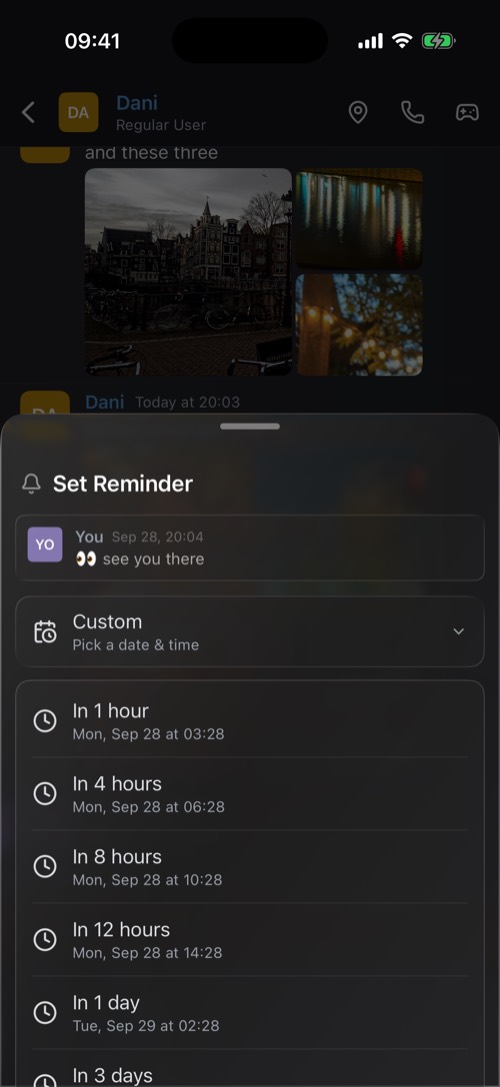
Hold the message and choose Set Reminder.
2
Pick In 1 hour, 4 hours, 8 hours, 12 hours, In 1 day, 3 days or In 1 week.
3
Or open Custom and pick a date and time. Custom reminders go off on the hour.
When it is time, a notification takes you straight back to the message. From the notification you can also choose Remind me in 10 min or Remind me in an hour.
The Reminders tab
For anything that is not a single message, open Reminders from the bottom bar (swipe it sideways):
- What should we remind you about? Type what it is.
- Where it goes: one or more chats and community channels.
- Who gets it: everyone in the chat, just you, or everyone except some people.
- When, and Notify me before: at the time, or from 15 minutes up to 2 days ahead.
- Repeat: once, daily, on weekdays, weekly or monthly.
Your reminders are listed under Planned, where you can edit, pause or cancel each one.
Good for: "bring the tickets" to the group on Friday morning, a weekly "bins out" for the house chat, or the question you want to answer after lunch.
Was this article helpful?
Didn’t find what you were looking for? We’re happy to help.
Ask your question