Message Actions: Reply, React, Edit & More
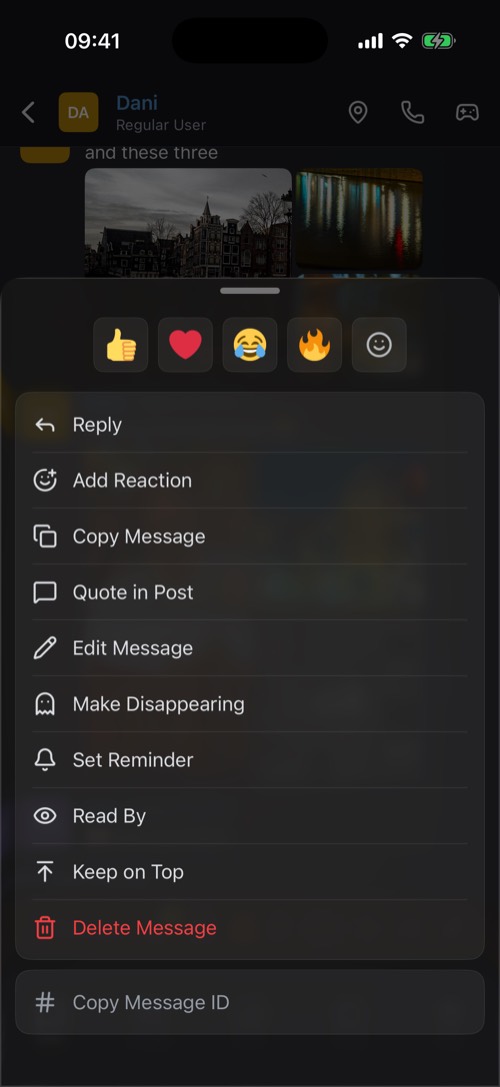
Hold any message for replies, reactions, reminders, keep on top, edit, delete, read receipts and reporting.
Hold a message for a moment and its options open. Swipe it to the left to reply straight away.
For every message
- Reply: quote it. Tap a quote later to jump back to the original.
- Add Reaction: your four most recent emoji are at the top, the 😊 button opens them all.
- Copy Message and Quote in Post, which puts the text on a photo for your story.
- Set Reminder: get a notification about it later. See Reminders.
- Read By: who has read it so far.
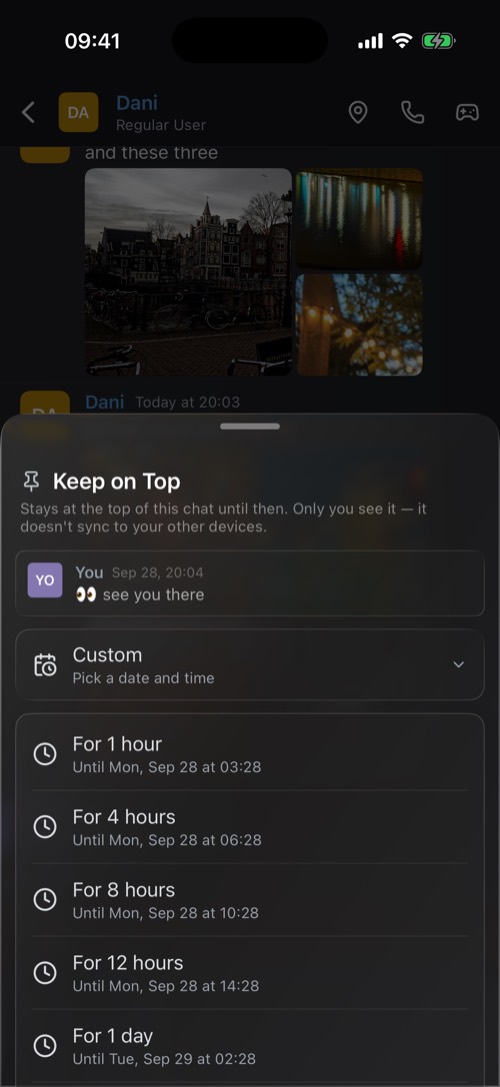
- Keep on Top: pin it above the chat for yourself, for an hour up to a week.
For photos and videos
- Save to Photos, or Save album for a set, or Select photos… to pick a few.
- Save to Memory: keep a private copy in your Memories.
For your own messages
- Edit Message, or Replace media to swap the photo or GIF.
- Make Disappearing (DMs): turn a message you already sent into a ghost message.
- Delete Message. This happens straight away, there is no second question.
- Cancel Sending, while a big upload is still on its way.
Keep on Top and Pin Message
They sound alike but work differently:
- Keep on Top works in every chat. The message sits in a bar above the conversation until the time runs out. Only you see it, and it stays on this device.
- Pin Message is for community channels, for members whose role allows pinning. Everyone finds it under the pin button at the top of the channel.
When something is wrong
At the bottom of the sheet: Report Message sends it to the mssgs moderators, and Block stops that person from contacting you. See Privacy & Safety.
Was this article helpful?
Didn’t find what you were looking for? We’re happy to help.
Ask your question