Voice & Video Calls
Call a friend from any DM, switch on your camera or share your screen, and keep the call floating while you chat.
Start a call
1
Open the chat and tap the phone at the top, or hold the chat in your list and choose Call.
2
A card asks Call Dani? first, so a mis-tap never rings anyone. Confirm and their phone rings.
Calls in DMs are between two people. Every call starts as a voice call.
During the call
- Camera: turn video on or off.
- Share screen: show your screen, to this call only or with a heads-up in the chat.
- Speaker, mute and volume per person.
- Reactions: throw an emoji across the call.
- Minimize: the call shrinks to a floating bar so you can keep using the app.
Call settings
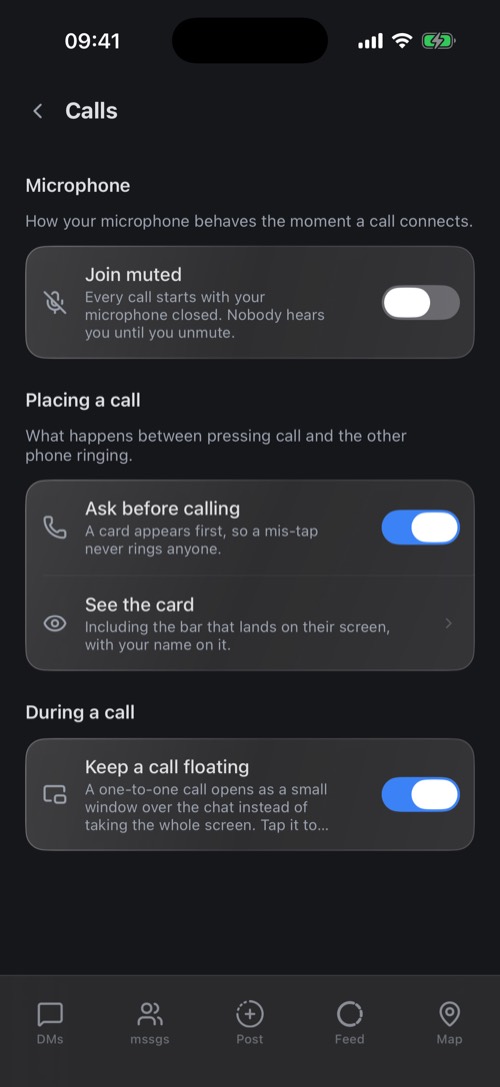
In Settings → Calls:
- Join muted: every call starts with your microphone off.
- Ask before calling: the confirmation card before a call rings. On by default.
- Keep a call floating: a call opens as a small window over the chat instead of full screen. On by default.
Your ringtone is in Settings → Notifications. To give one friend their own ringtone, hold their chat and choose Ringtone.
Voice channels in communities
Communities can have voice channels: tap Join Voice and you are in, with the same mute, camera and screen-share controls. Someone too loud? Hold them and choose Mute for me.
Was this article helpful?
Didn’t find what you were looking for? We’re happy to help.
Ask your question