Inviting People
Invite links and QR codes with an expiry and a usage limit, and who may join your community.
Send an invite
Hold the community's icon and choose Invite People, or use Send Invite from the + above the channel list. Share the link, or show the QR code to someone next to you.
Members who are not the owner see Invite Others instead, if the community allows members to invite.
Manage invite codes
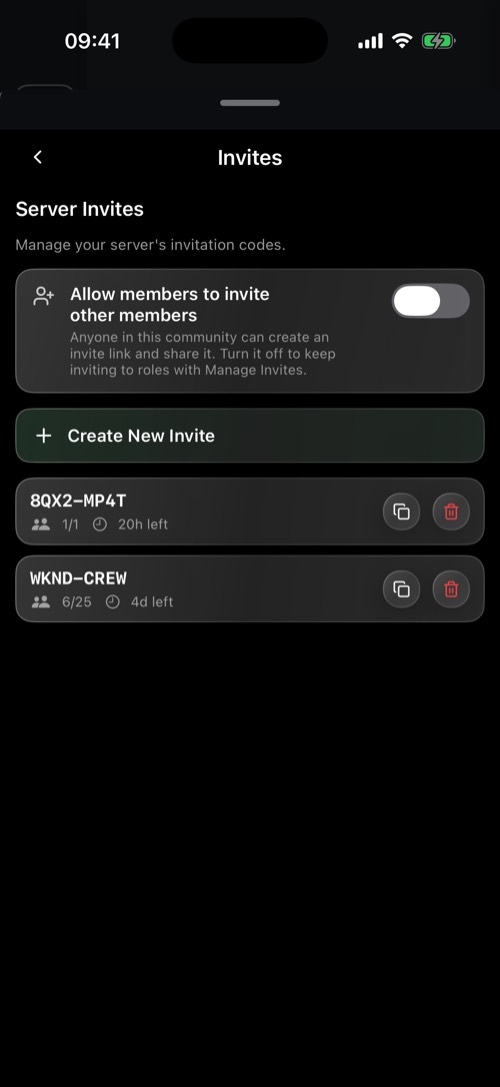
Go to Server Settings → Invites:
- Create New Invite, with an expiry (1 hour up to 30 days, or never) and a usage limit (1 up to 100 uses, or unlimited).
- See how often each code was used, and delete codes you no longer want.
- Allow members to invite other members: let everyone create invites, not just roles with the invite permission.
Who may join
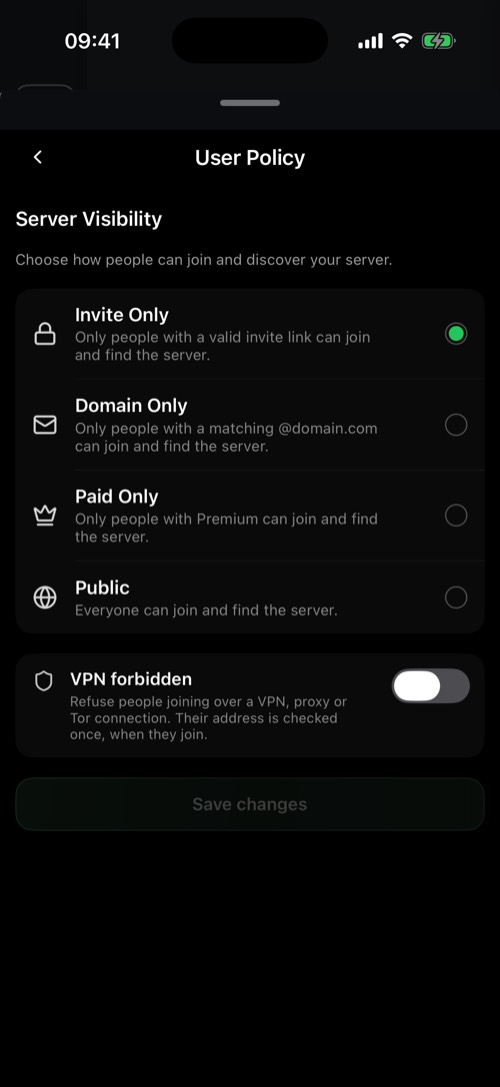
Server Settings → User Policy decides who can find and join your community:
- Invite Only: only people with a valid invite.
- Domain Only: only people with an email address on the domains you list. Handy for a company or a school.
- Paid Only: only Premium members.
- Public: anyone can find and join it.
VPN forbidden refuses people who join through a VPN, proxy or Tor.
Was this article helpful?
Didn’t find what you were looking for? We’re happy to help.
Ask your question