Quick Start Guide
From a fresh install to your first chat, game, story and community in five minutes.
Here is the fastest route through the app. Each step links to a longer guide.
1. Add a friend
Tap + above your chat list and search their username, or show them your QR code. See Adding Friends.
2. Send your first message
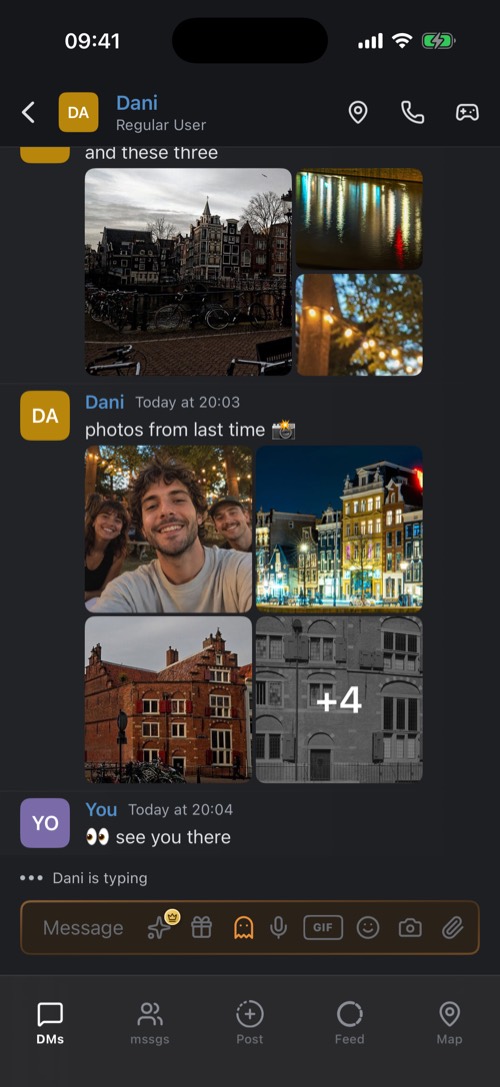
Type in the bar at the bottom and tap send. Swipe a message to the left to reply to it, and hold it for everything else: reactions, reminders, keep on top, edit and delete. See Message Actions.
3. Play a game
Tap the game controller at the top of the chat and pick a game. An invite card lands in the chat, your friend taps Join game and the lobby opens. See Playing Games.
4. Post a story
Tap Post in the bottom bar, take a photo, add a filter or text and choose where it goes: your feed, a story, a private group or a chat. See Posting Photos & Stories.
5. Join or start a community
Open an invite link from a friend, scan an invite QR code, or tap + in the search screen and choose Create server. See Creating a Community.
Was this article helpful?
Didn’t find what you were looking for? We’re happy to help.
Ask your question