Contact Support
How to reach the mssgs team, send your logs from the app, and what to include so we can help quickly.
Could not find the answer here? A person reads every message.
From the app
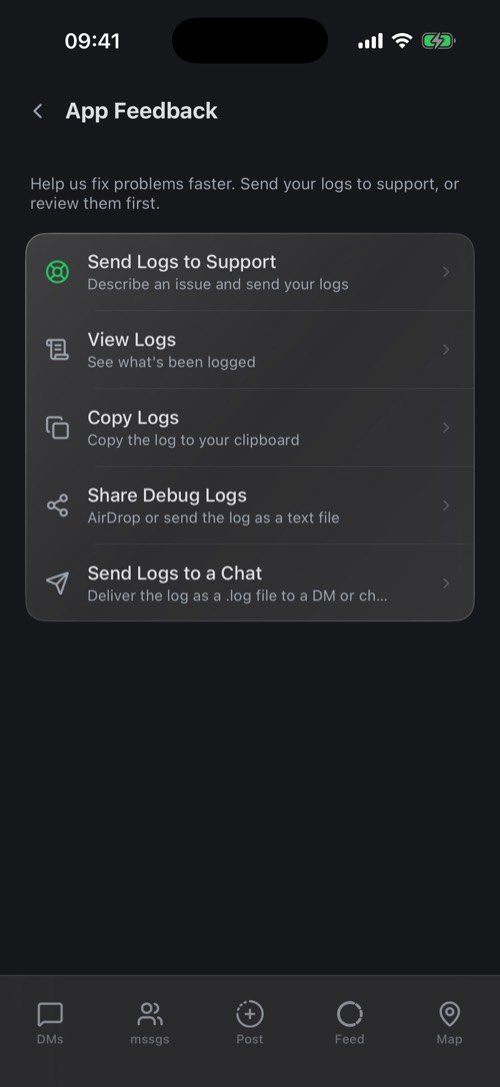
Go to Settings → App Feedback and choose Send Logs to Support. Describe what happened and send it: your logs go with it, so we can see what went wrong. The same screen lets you View Logs, copy them or send them to a chat.
Other ways
- Contact form: mss.gs/contact
- Email: support@mss.gs
We usually reply within 24 hours.
Help us help you
- Your username. Never your password or a sign-in code: we will never ask for them.
- Where it happens: iPhone, Android, desktop or the web.
- What you expected, and what happened instead.
- A screenshot or screen recording, if you can.
Down for everyone? Check status.mss.gs first. Live status and past incidents are listed there.
Was this article helpful?
Didn’t find what you were looking for? We’re happy to help.
Ask your question